
blahaj-color-theme
A cool ocean-and-shark color scheme for code, terminals, and editors.
License: MIT License

Blåhaj themes
A cool ocean-and-shark color scheme for code, terminals, editors, and websites. Blåhaj Ice for daylight. Blåhaj Ocean for late sessions.
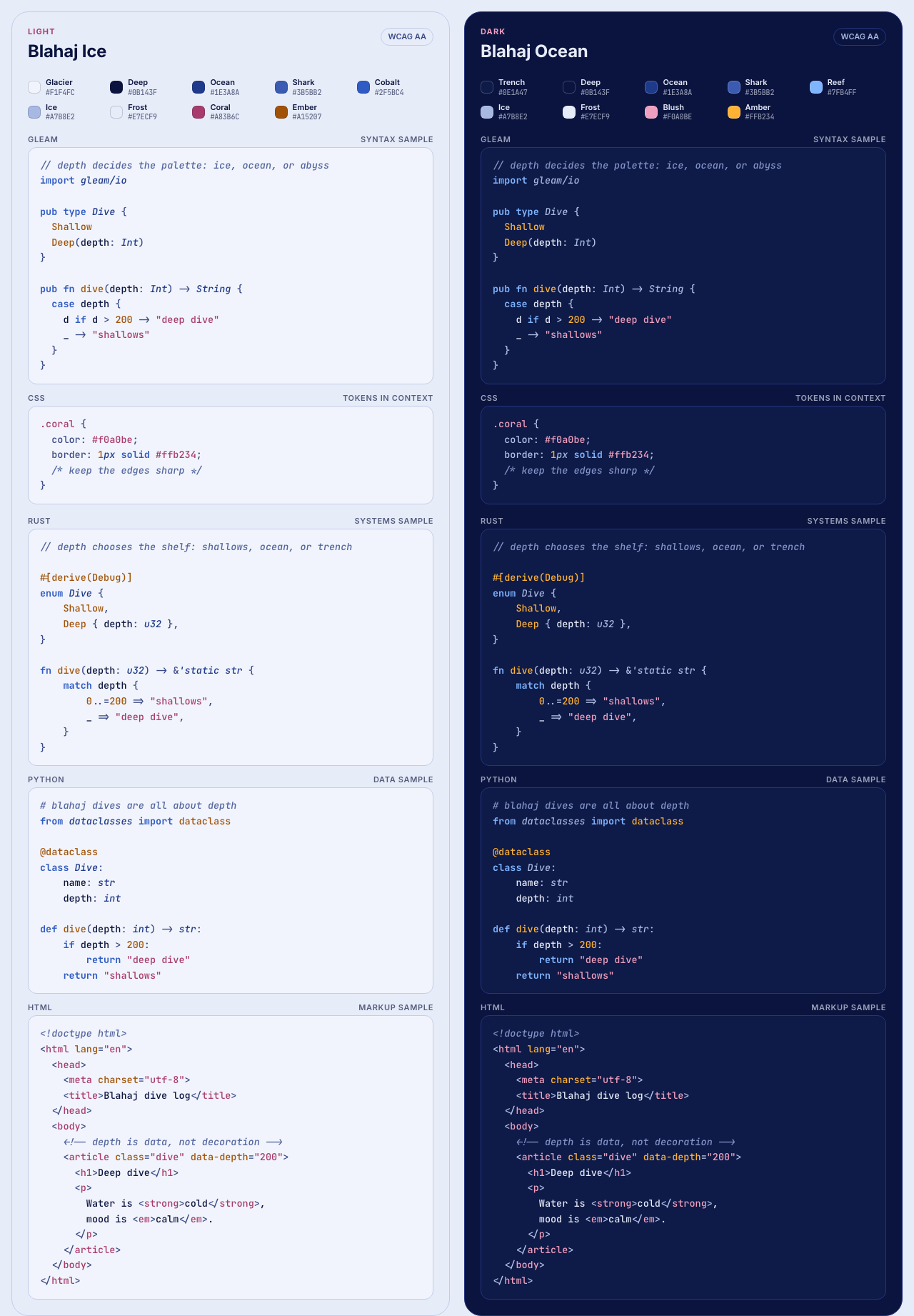
Palette
Colors are named after the ocean, not after syntax. Each row pairs the same role across the two variants.
| Role | Blåhaj Ice | Blåhaj Ocean |
|---|---|---|
| Code background | Glacier #F1F4FC |
Trench #0E1A47 |
| Body text, variables | Deep #0B143F |
Frost #E7ECF9 |
| Keywords, modifiers, bold | Cobalt #2F5BC4 |
Reef #7FB4FF |
| Functions, constructors, numbers, constants, attributes | Ember #A15207 |
Amber #FFB234 |
| Types, classes, namespaces, italic | Ocean #1E3A8A |
Ice #A7B8E2 |
| Strings, tags, errors | Coral #A83B6C |
Blush #F0A0BE |
| Comments, italic | Mist #52659E |
Mist #8394C9 |
| Properties, operators, punctuation | Foam #3A4A86 |
Foam #B4C2E8 |
| Borders, dividers | Haze #C3CDEA |
Brine #243580 |
| ANSI green | Kelp #1A6B4C |
Kelp #6FD3A0 |
| ANSI magenta | Urchin #7A3B99 |
Urchin #D3A8F5 |
| ANSI cyan | Lagoon #136A7A |
Lagoon #79D9E9 |
| Brand | Shark #3B5BB2 |
Shark #3B5BB2 |
Website palette
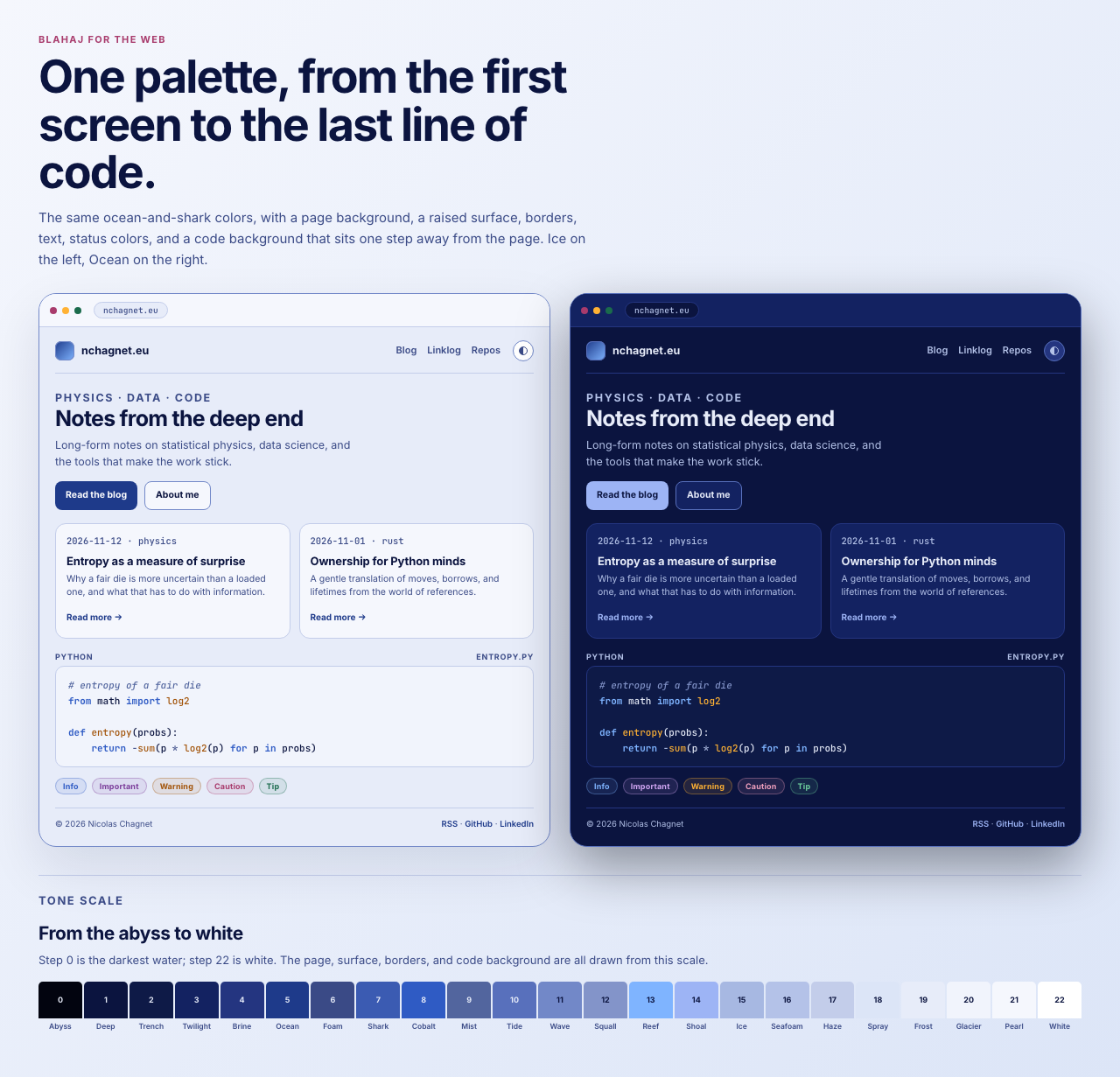
A website uses the same colors for different jobs. The page background and the code background are separate steps on purpose: a code block should not wash into the page around it.
| Role | Blåhaj Ice | Blåhaj Ocean |
|---|---|---|
| Page background | Frost #E7ECF9 |
Deep #0B143F |
| Surface | Pearl #F5F7FD |
Twilight #132261 |
| Raised surface | White #FFFFFF |
Brine #243580 |
| Code background | Glacier #F1F4FC |
Trench #0E1A47 |
| Body text | Deep #0B143F |
Frost #E7ECF9 |
| Muted text | Foam #3A4A86 |
Seafoam #B4C2E8 |
| Subtle text | Mist #52659E |
Ice #A7B8E2 |
| Primary | Ocean #1E3A8A |
Shoal #9DB4F5 |
| Accent | Coral #A83B6C |
Blush #F0A0BE |
| Border | Wave #7288C8 |
Tide #5870BC |
| Subtle border | Haze #C3CDEA |
Brine #243580 |
| Selection | Haze #C3CDEA |
Shark at 40% |
| Info | Cobalt #2F5BC4 |
Reef #7FB4FF |
| Important | Urchin #7A3B99 |
Orchid #D3A8F5 |
| Warning | Ember #A15207 |
Amber #FFB234 |
| Caution | Coral #A83B6C |
Blush #F0A0BE |
| Tip | Kelp #1A6B4C |
Seagrass #6FD3A0 |
| Brand | Shark #3B5BB2 |
Shark #3B5BB2 |
The status colors reuse the ANSI accents, so an admonition and a terminal agree on what red, green, and blue mean.
Tone scale
The blue axis runs from the abyss to white. Step 0 is the darkest and step 22 is white; the ocean names and the numbered steps are the same colors.
 0 Abyss    #02040F   6 Foam     #3A4A86  12 Squall   #8394C9  18 Spray    #DCE5F7
 1 Deep     #0B143F   7 Shark    #3B5BB2  13 Reef     #7FB4FF  19 Frost    #E7ECF9
 2 Trench   #0E1A47   8 Cobalt   #2F5BC4  14 Shoal    #9DB4F5  20 Glacier  #F1F4FC
 3 Twilight #132261   9 Mist     #52659E  15 Ice      #A7B8E2  21 Pearl    #F5F7FD
 4 Brine    #243580  10 Tide     #5870BC  16 Seafoam  #B4C2E8  22 White    #FFFFFF
 5 Ocean    #1E3A8A  11 Wave     #7288C8  17 Haze     #C3CDEA
Terminals and editors
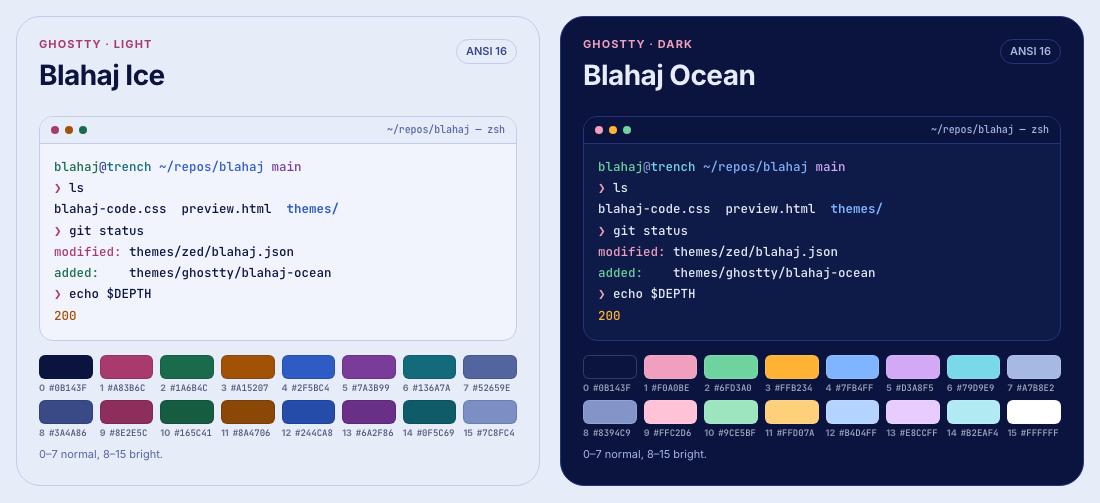
ANSI terminals need green, magenta, and cyan, so the scheme adds Kelp, Urchin, and Lagoon. Ghostty, Zed, and the VS Code integrated terminal use the same 16 colors; Helix uses the same accents for syntax and UI. Normal ANSI colors are at least 5:1 on their backgrounds.
Install
VS Code
npx @vscode/vsce package
code --install-extension blahaj-color-scheme-0.1.0.vsix
Choose Blåhaj Ice or Blåhaj Ocean from the color theme picker.
Ghostty
mkdir -p ~/.config/ghostty/themes
cp themes/ghostty/blahaj-* ~/.config/ghostty/themes/
Then add this to ~/.config/ghostty/config:
theme = light:blahaj-ice,dark:blahaj-oceanZed
mkdir -p ~/.config/zed/themes
cp themes/zed/blahaj.json ~/.config/zed/themes/
Choose Blåhaj Ice or Blåhaj Ocean from the theme picker.
Helix
mkdir -p ~/.config/helix/themes
cp themes/helix/blahaj-*.toml ~/.config/helix/themes/
Then set the theme in ~/.config/helix/config.toml:
theme = "blahaj-ice" # or "blahaj-ocean"Helix does not switch themes with the OS automatically yet. Use :theme to
change it while the editor is open.
Websites
Link the site theme before the stylesheet of the site, and the code theme if the site shows code:
<link rel="stylesheet" href="blahaj-theme.css">
<link rel="stylesheet" href="blahaj-code.css">
Then use the semantic tokens:
body {
    background-color: var(--blahaj-background);
    color: var(--blahaj-text);
}

.card {
    background-color: var(--blahaj-surface);
    border: 1px solid var(--blahaj-border);
}

a {
    color: var(--blahaj-primary);
}
data-theme="light" or data-theme="dark" on <html>, or the light and
dark classes, pin a scheme. Without either, the theme follows the operating
system.
The named colors are fixed values. Use the semantic tokens (--blahaj-text,
--blahaj-background, and so on) when a color should switch between light
and dark. The tone steps are --blahaj-blue-0 through --blahaj-blue-22.
The page and code backgrounds are separate: --blahaj-background is
Frost/Deep, while --blahaj-code-background is Glacier/Trench.
Code blocks
<pre class="blahaj-code"><code>...</code></pre>Light is the default. Dark follows [data-theme="dark"], .blahaj-code--dark,
or the OS preference. Token classes follow Pygments short names.
Notes
Every syntax color meets WCAG AA (4.5:1) on its own background. The website text and status tokens do the same on the page, surface, and raised-surface colors in both schemes.